
How to show your child's QR code for school check-in
Drop-off is quick with Klassy. You show a QR code on your phone, the teacher scans it, and you are notified that your child has been checked in.
Step by step
Open the Klassy parent app
Sign in with the login your school gave you.
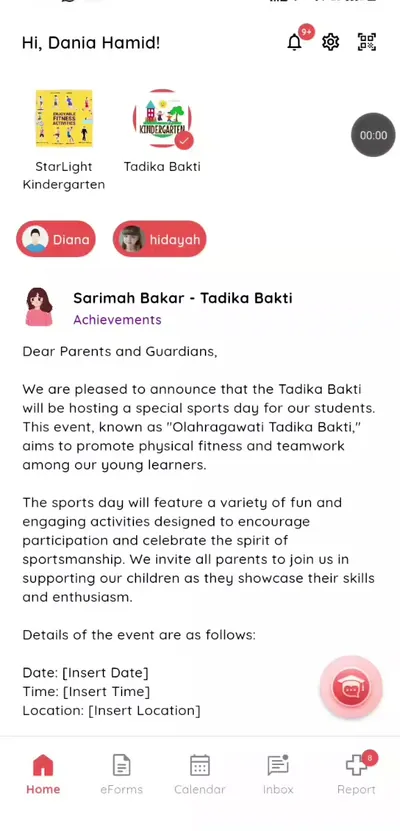
Step 1: Open the Klassy parent app (parent app) Open the QR code
Tap the QR icon at the top of the home screen.
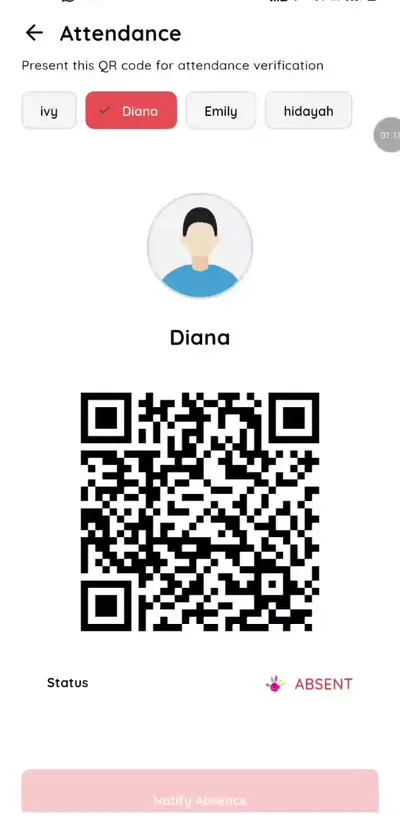
Step 2: Open the QR code (parent app) Choose your child
If you have more than one child, pick the right one at the top.
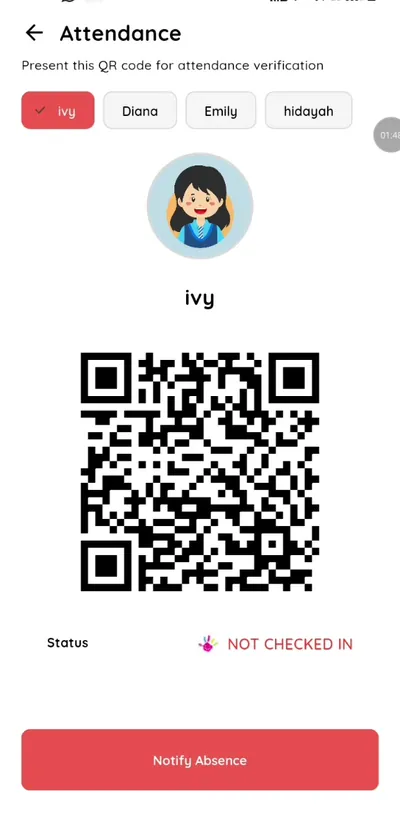
Step 3: Choose your child (parent app) Show the QR code to the teacher
The teacher scans it from the teacher app.
Step 4: Show the QR code to the teacher (parent app) Check the status
The status changes from Not checked in to Checked in.
Step 5: Check the status (parent app) Scan again at pick-up
The teacher scans the same code to clock your child out.
Step 6: Scan again at pick-up (parent app)
A simple school check-in app for parents
QR check-in means no queues and no paper sign-in book. You know straight away that your child has arrived, and the school has an accurate record of arrival and pick-up times.
What you get with Klassy
- Free for parents
- One QR code per child
- Instant check-in notification
- Works for pick-up as well
Klassy is used by kindergartens, tadika, preschools, childcare centres, tuition centres and private schools. It is built in Malaysia and also available for Australia, Thailand, Indonesia and Vietnam. See pricing.
Common questions
Do I pay to use the Klassy parent app?
No. The parent app is free for parents.
What if I have two children?
Switch between your children at the top of the screen. Each has their own QR code.
What if I forgot my phone?
The teacher can check your child in manually.
Want this for your school?
Klassy is AI-powered school management software for kindergartens, tadika, preschools, childcare centres, tuition centres and private schools. Message the team and we will show you how it fits your school.
Also available for Australia, Thailand, Indonesia and Vietnam.
Related guides
More in Attendance and check-in
Browse the Help Centre: For schools For teachers For parents All guides