
How to fill in school forms and permission slips in the app
No more printing and signing. Fill in permission slips and school forms on your phone.
Step by step
Open eForms
Tap eForms in the parent app.
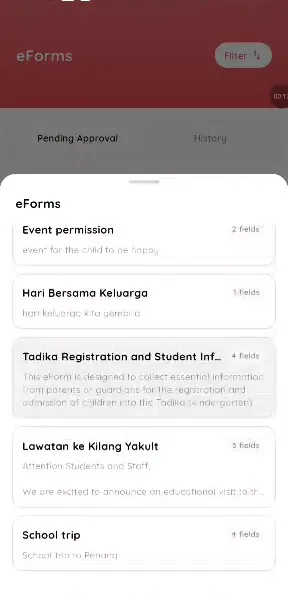
Step 1: Open eForms (parent app) Tap the plus button
Choose the form.
Step 2: Tap the plus button (parent app) Choose the child
Pick who the form is for.
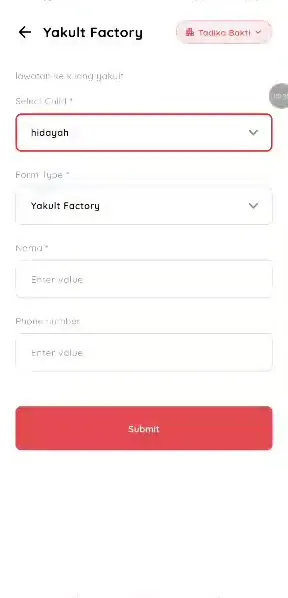
Step 3: Choose the child (parent app) Fill in the fields
Complete the form.
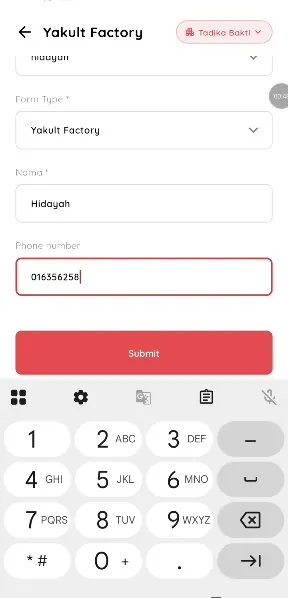
Step 4: Fill in the fields (parent app) Submit
Send it to the school.
Step 5: Submit (parent app) Check Pending approval
See it while the school reviews.
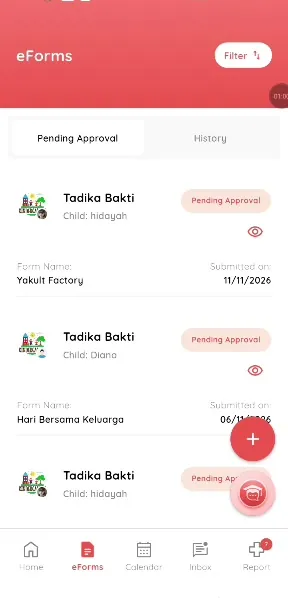
Step 6: Check Pending approval (parent app) Handle a rejection
If rejected, open History and submit again.
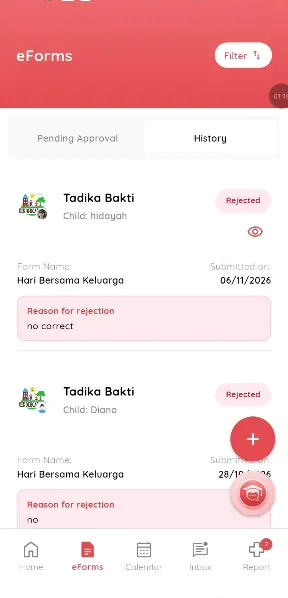
Step 7: Handle a rejection (parent app)
Digital permission slips for parents
Parents can complete a form in a minute, wherever they are.
What you get with Klassy
- Forms on your phone
- Track approval
- Resubmit if rejected
Klassy is used by childcare centres, early learning centres, kindergartens, preschools and private schools. It is built in Malaysia and also available for Malaysia, Thailand, Indonesia and Vietnam. See pricing.
Common questions
Where do I see my submitted forms?
In Pending approval and History.
What if my form is rejected?
Open it, read the reason and submit again.
Is it free?
Yes.
Want this for your school?
Klassy is AI-powered school management software for childcare centres, early learning centres, kindergartens, preschools and private schools. Message the team and we will show you how it fits your school.
Also available for Malaysia, Thailand, Indonesia and Vietnam.
Related guides
Browse the Help Centre: For schools For teachers For parents All guides