
Classroom game room: make groups and award points
Group activities and rewards motivate young learners. The Klassy game room makes random groups and keeps score.
Step by step
Open the game room
Tap Game room in the class view.
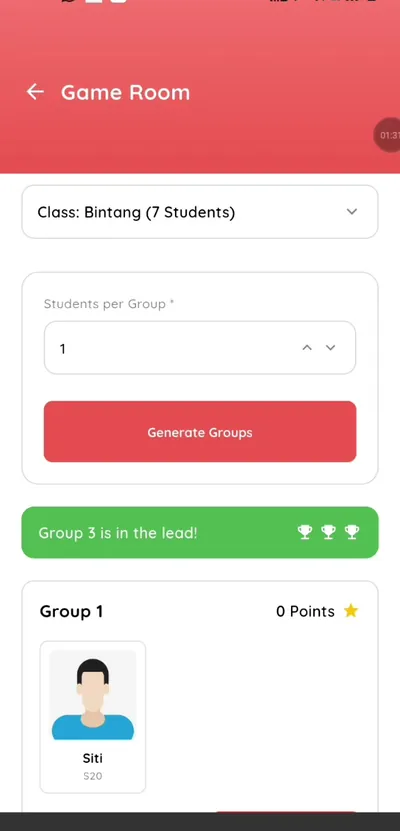
Step 1: Open the game room (teacher app) Choose students per group
Set how many children should be in each group.
Step 2: Choose students per group (teacher app) Generate groups
Klassy creates the groups for you.
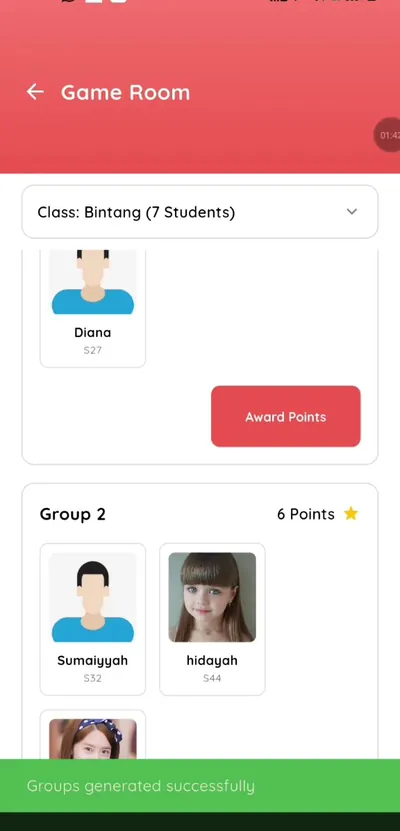
Step 3: Generate groups (teacher app) Award points
Give points to students as they earn them.
Step 4: Award points (teacher app) See who is leading
The group points show who is ahead.
Step 5: See who is leading (teacher app)
Gamified classroom tools for teachers
Instead of picking groups by hand, let the game room do it fairly and quickly.
What you get with Klassy
- Random group generation
- Group sizes you choose
- Points and leaderboard
- In the same teacher app
Klassy is used by childcare centres, early learning centres, kindergartens, preschools and private schools. It is built in Malaysia and also available for Malaysia, Thailand, Indonesia and Vietnam. See pricing.
Common questions
How are groups made?
Klassy generates them from your class.
Can I award points?
Yes, to students.
Is it for all classes?
Yes.
Want this for your school?
Klassy is AI-powered school management software for childcare centres, early learning centres, kindergartens, preschools and private schools. Message the team and we will show you how it fits your school.
Also available for Malaysia, Thailand, Indonesia and Vietnam.
Related guides
More in Teacher app and classroom tools
Browse the Help Centre: For schools For teachers For parents All guides