
How parents view health reports and incident history
Teachers record health information at school and parents can review it in the app. You can also confirm allergy details.
Step by step
Tap Report
In the bottom bar of the parent app.
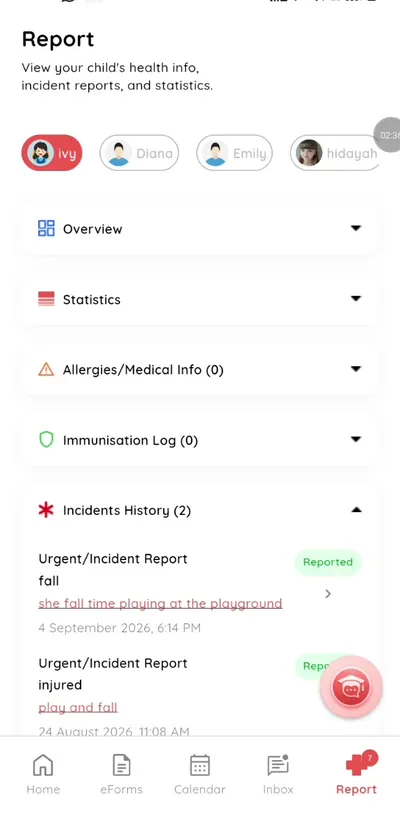
Step 1: Tap Report (parent app) Choose your child
Switch child at the top.
Step 2: Choose your child (parent app) Review the overview
See health information and statistics.
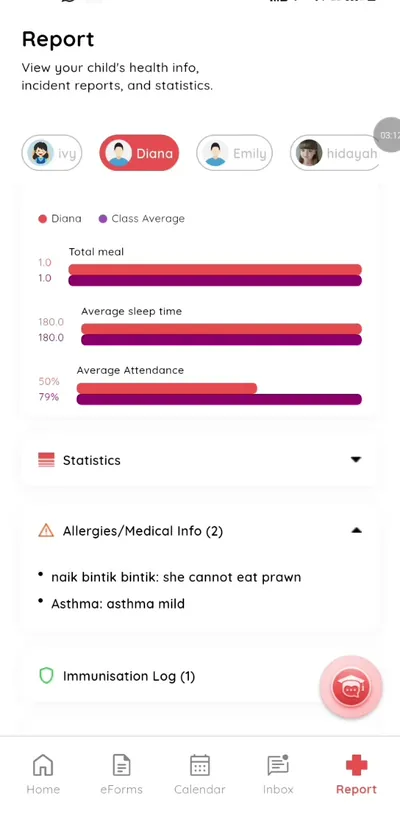
Step 3: Review the overview (parent app) Check allergies
Review allergy information and confirm it is right.
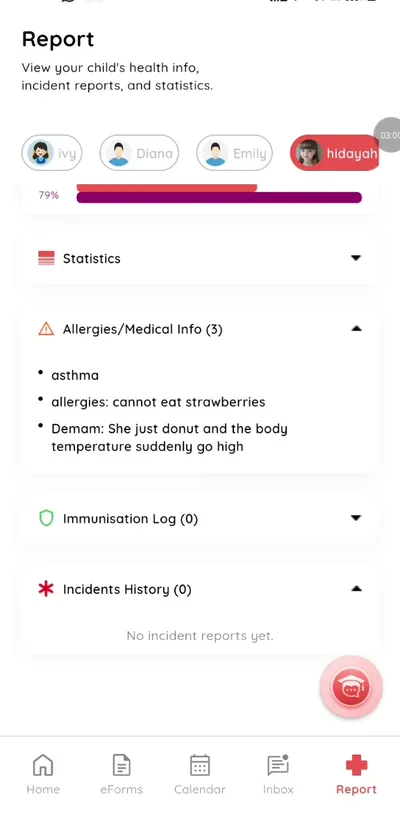
Step 4: Check allergies (parent app) Open incident history
See incidents during school time.
Step 5: Open incident history (parent app)
Know what happened at school
Health and incident information is shared promptly and kept in one place.
What you get with Klassy
- Health overview
- Allergy confirmation
- Incident history
- Notifications
Klassy is used by kindergartens, tadika, preschools, childcare centres, tuition centres and private schools. It is built in Malaysia and also available for Australia, Thailand, Indonesia and Vietnam. See pricing.
Common questions
Can I confirm allergies?
Yes.
Will I be told about incidents?
Yes, you receive a notification.
Who writes the reports?
Your child's teachers.
Want this for your school?
Klassy is AI-powered school management software for kindergartens, tadika, preschools, childcare centres, tuition centres and private schools. Message the team and we will show you how it fits your school.
Also available for Australia, Thailand, Indonesia and Vietnam.
Related guides
More in Health and incident records
Browse the Help Centre: For schools For teachers For parents All guides