
How to use the Klassy AI assistant in the parent app
Parents often ask the same questions. The AI assistant answers from your school's FAQ.
Step by step
Open the assistant
Find it in the Report tab.
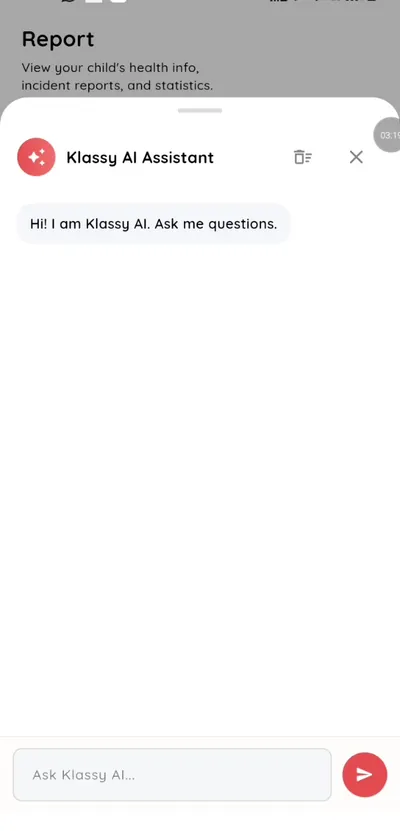
Step 1: Open the assistant (parent app) Type your question
Ask in plain language.
Step 2: Type your question (parent app) Read the answer
Answers come from your school's FAQ.
Step 3: Read the answer (parent app) Message the teacher for personal questions
For anything about your own child, use Inbox to message the teacher.
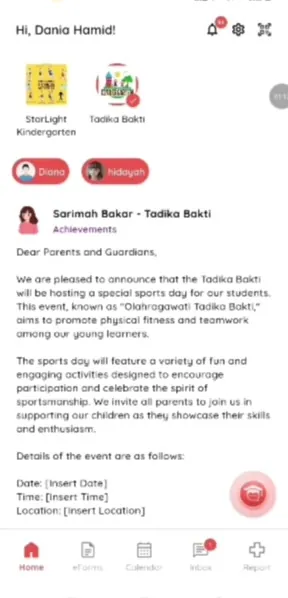
Step 4: Message the teacher for personal questions (parent app)
An AI assistant for school parents
Quick answers reduce messages to the office.
What you get with Klassy
- Plain language questions
- Based on the school FAQ
- In the parent app
Klassy is used by kindergartens, tadika, preschools, childcare centres, tuition centres and private schools. It is built in Malaysia and also available for Australia, Thailand, Indonesia and Vietnam. See pricing.
Common questions
What can I ask?
Common school questions covered by the FAQ.
Is it a person?
No. It is an AI assistant.
Who sets the answers?
Your school.
Want this for your school?
Klassy is AI-powered school management software for kindergartens, tadika, preschools, childcare centres, tuition centres and private schools. Message the team and we will show you how it fits your school.
Also available for Australia, Thailand, Indonesia and Vietnam.
Related guides
More in Klassy AI
Browse the Help Centre: For schools For teachers For parents All guides