
AI writing help for teachers: draft logs and event descriptions
Teachers write many short messages. Klassy AI gives you a first draft so you can focus on the children.
Step by step
Open a log or event
Start creating it in the teacher app.
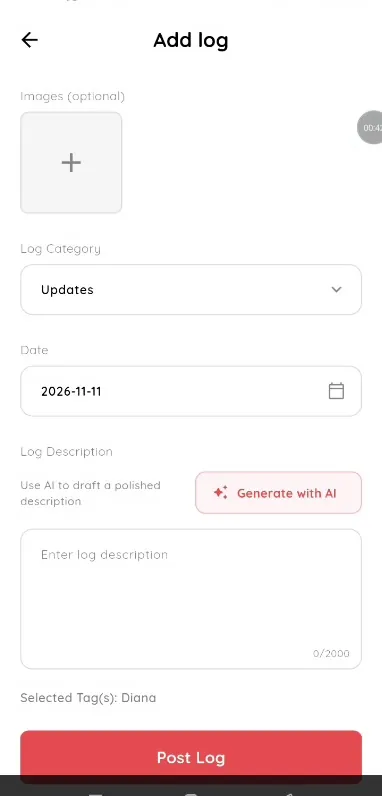
Step 1: Open a log or event (teacher app) Tap the AI button
It appears beside the description box.
Step 2: Tap the AI button (teacher app) Type a short prompt
A few words are enough.
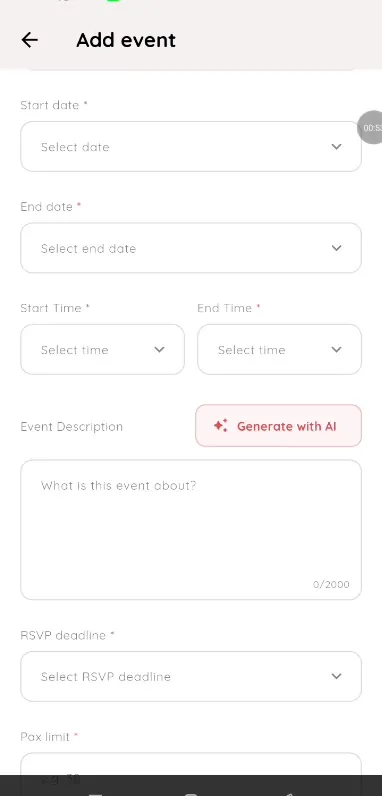
Step 3: Type a short prompt (teacher app) Edit and post
Review the draft before posting.
Step 4: Edit and post (teacher app) Use AI for events too
The same AI button helps with event descriptions in the calendar.
Step 5: Use AI for events too (teacher app) Tag the children and post
Choose the class or students, check the tags and post.
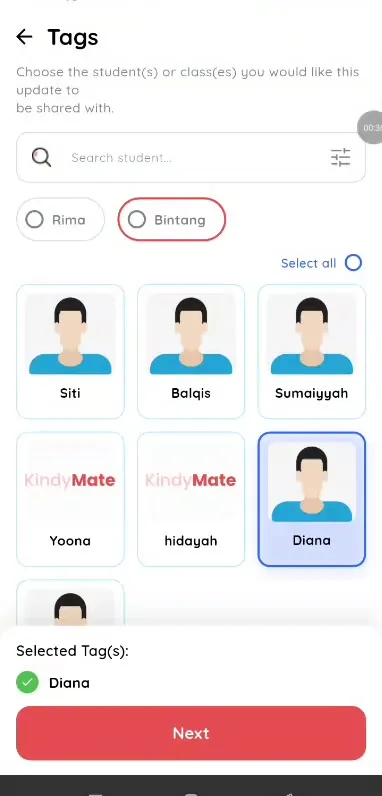
Step 6: Tag the children and post (teacher app)
Save time on parent communication
A good first draft in seconds means more time with children.
What you get with Klassy
- Drafts logs and events
- Review before posting
- Professional and above
Klassy is used by kindergartens, tadika, preschools, childcare centres, tuition centres and private schools. It is built in Malaysia and also available for Australia, Thailand, Indonesia and Vietnam. See pricing.
Common questions
Does AI post for me?
No, you review and post.
Which plans?
Professional and above.
Where can I use it?
In the places teachers write.
Want this for your school?
Klassy is AI-powered school management software for kindergartens, tadika, preschools, childcare centres, tuition centres and private schools. Message the team and we will show you how it fits your school.
Also available for Australia, Thailand, Indonesia and Vietnam.
Related guides
More in Klassy AI
Browse the Help Centre: For schools For teachers For parents All guides