
School data storage: see every uploaded file and export the list
Photos and files add up. Klassy shows exactly what is stored so you can plan capacity.
Step by step
Open Settings
Choose the Storage tab.
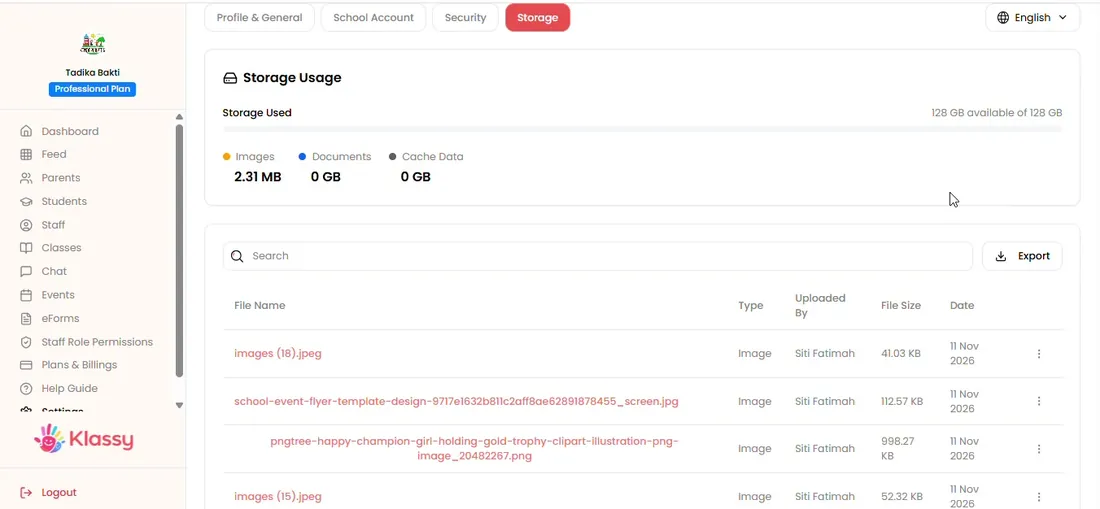
Step 1: Open Settings (admin panel) Review the usage
See how much of your storage is used.
Step 2: Review the usage (admin panel) Browse uploaded files
Every file is listed with its date and size.
Step 3: Browse uploaded files (admin panel) Export the list
Export gives you a record of stored files.
Step 4: Export the list (admin panel) Check storage on the dashboard
Account health on the dashboard also shows total users and storage.
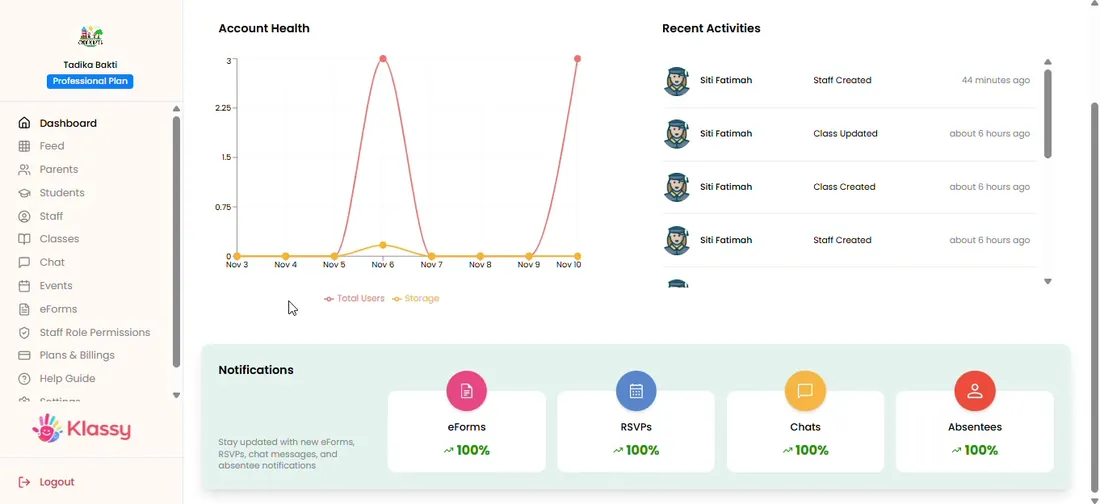
Step 5: Check storage on the dashboard (admin panel) Plan ahead
If you are close to your limit, open Plan and billing to compare plans.

Step 6: Plan ahead (admin panel)
Transparent storage for school data
You should always know what your school stores and where. Klassy lists every file and lets you export it.
What you get with Klassy
- File list with dates and sizes
- Storage used against plan
- Exportable record
- Shown on the dashboard
Klassy is used by kindergartens, tadika, preschools, childcare centres, tuition centres and private schools. It is built in Malaysia and also available for Australia, Thailand, Indonesia and Vietnam. See pricing.
Common questions
How much storage do I get?
32 GB on the Free plan, 128 GB on Lite and 250 GB on Professional. Enterprise storage is set to fit your school group.
Can I see old files?
Yes. Every uploaded file is listed with its date.
Where is data stored in Malaysia?
Data is stored on Malaysian servers and handled in line with PDPA.
Want this for your school?
Klassy is AI-powered school management software for kindergartens, tadika, preschools, childcare centres, tuition centres and private schools. Message the team and we will show you how it fits your school.
Also available for Australia, Thailand, Indonesia and Vietnam.
Related guides
More in Plan, settings and storage
Browse the Help Centre: For schools For teachers For parents All guides