
How to tell the school your child is absent
If your child is sick or away, you can tell the school in the app. The teacher is notified immediately, with your reason.
Step by step
Open the Klassy parent app
Choose your child at the top.
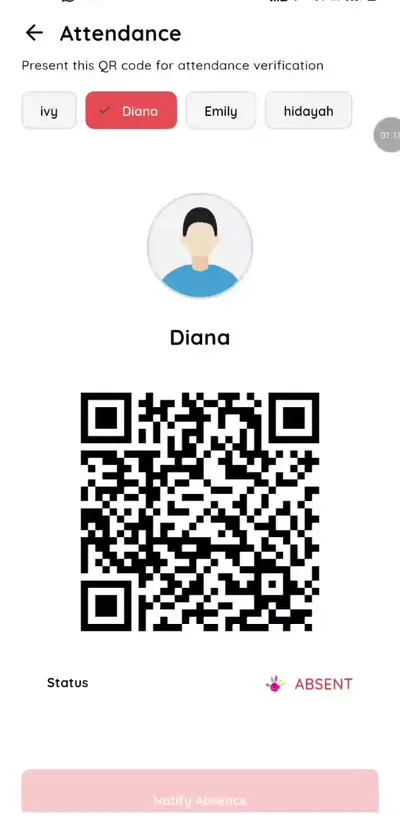
Step 1: Open the Klassy parent app (parent app) Tap Notify absence
The button is below the QR code.
Step 2: Tap Notify absence (parent app) Type the reason
For example fever or family trip.
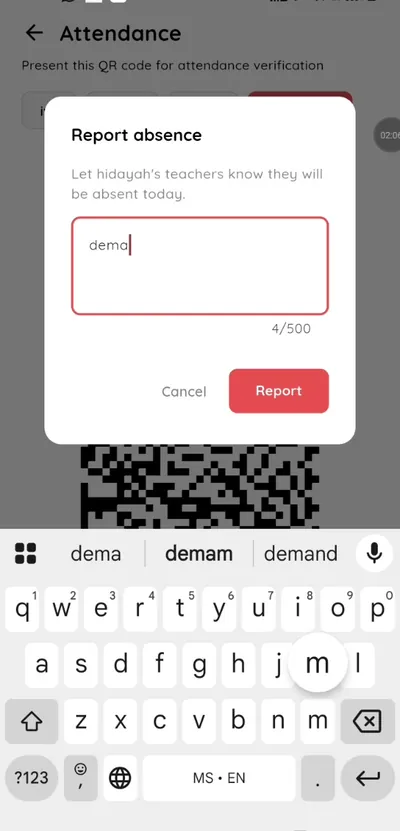
Step 3: Type the reason (parent app) Send
The teacher receives a notification that your child will be absent today.
Step 4: Send (parent app) Check the status
The status shows Absent.
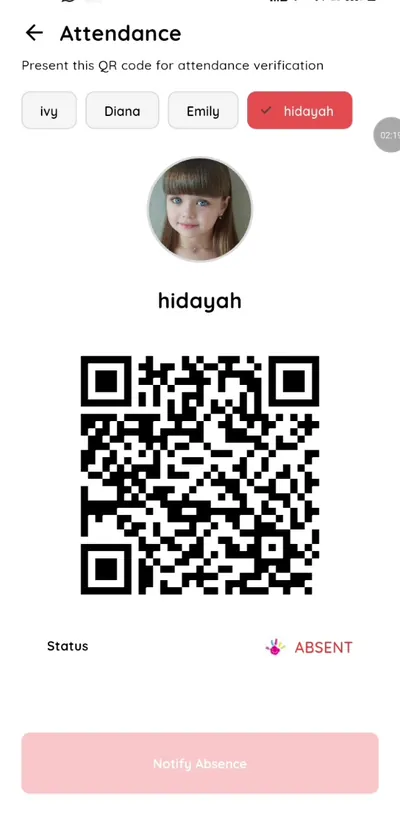
Step 5: Check the status (parent app)
Absence reporting without phone calls
Parents save a phone call and teachers get a clear written reason.
What you get with Klassy
- One tap to notify
- Reason included
- Teacher notified immediately
Klassy is used by childcare centres, early learning centres, kindergartens, preschools and private schools. It is built in Malaysia and also available for Malaysia, Thailand, Indonesia and Vietnam. See pricing.
Common questions
Can I notify in advance?
You can notify on the day your child will be away.
Does the teacher see the reason?
Yes.
Is it free?
Yes.
Want this for your school?
Klassy is AI-powered school management software for childcare centres, early learning centres, kindergartens, preschools and private schools. Message the team and we will show you how it fits your school.
Also available for Malaysia, Thailand, Indonesia and Vietnam.
Related guides
More in Attendance and check-in
Browse the Help Centre: For schools For teachers For parents All guides